

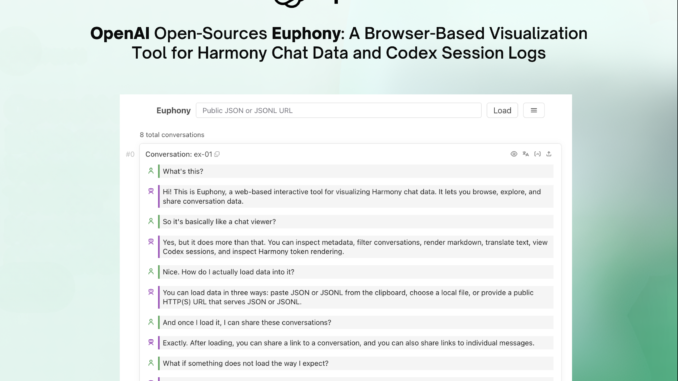
Debugging an AI agent that runs for dozens of steps: reading files, calling APIs, writing code, and revising its own output, is not like debugging a regular function. There is no single stack trace to read. Instead, developers are left staring at hundreds of lines of raw JSON, trying to reconstruct what the model was actually thinking and doing at each step. OpenAI team is taking a direct swing at that problem with the release of Euphony, a new open-source browser-based visualization tool designed to turn structured chat data and Codex session logs into readable, interactive conversation views.
Euphony is built specifically around two of OpenAI’s own data formats: Harmony conversations and Codex session JSONL files.
What is the Harmony Format?
To understand why Euphony exists, you need a quick primer on Harmony. OpenAI’s open-weight model series, gpt-oss, was trained on a specialized prompt format called the harmony response format. Unlike standard chat formats, Harmony supports multi-channel outputs — meaning the model can produce reasoning output, tool calling preambles, and regular responses all within a single structured conversation. It also supports role-based instruction hierarchies (system, developer, user, assistant) and named tool namespaces.
The result is that a single Harmony conversation stored as a .json or .jsonl file can contain a lot more structured metadata than a typical OpenAI API response. This richness is useful for training, evaluation, and agent workflows but it also makes raw inspection painful. Without tooling, you are reading deeply nested JSON objects with token IDs, decoded tokens, and rendered display strings all interleaved. Euphony was built to solve exactly this problem.
What Euphony Actually Does
At its core, Euphony is a web component library and standalone web app that ingests Harmony JSON/JSONL data or Codex session JSONL files and renders them as structured, browseable conversation timelines in the browser.
The tool supports three data loading methods out of the box: pasting JSON or JSONL directly from the clipboard, loading a local .json or .jsonl file from disk, or pointing it at any public HTTP(S) URL serving JSON or JSONL — including Hugging Face dataset URLs. Euphony then auto-detects the format and renders accordingly across four cases: if the JSONL is a list of conversations, it renders all conversations; if it detects a Codex session file, it renders a structured Codex session timeline; if a conversation is stored under a top-level field, it renders all conversations and treats other top-level fields as per-conversation metadata; and if none of those match, it falls back to rendering the data as raw JSON objects.
The feature set goes well beyond basic rendering. Euphony surfaces conversation-level and message-level metadata directly in the UI through a dedicated metadata inspection panel — useful when evaluating annotated datasets where each conversation carries extra fields like scores, sources, or labels. It also supports JMESPath-based filtering, which lets developers narrow down large datasets by querying over the JSON structure. There is a focus mode that filters visible messages by role, recipient, or content type, a grid view for skimming datasets quickly, and an editor mode for directly modifying JSONL content in the browser. Markdown rendering (including mathematical formulas) and optional HTML rendering are supported inside message content.
Two Operating Modes: Frontend-Only vs. Backend-Assisted
Euphony is designed with a clean architectural split. In frontend-only mode (configured via the VITE_EUPHONY_FRONTEND_ONLY=true environment variable), the entire app runs in the browser with no server dependency. In backend-assisted mode, a local FastAPI Python server handles remote JSON/JSONL loading, backend translation, and Harmony rendering — which is particularly useful for loading large datasets.
Embedding Euphony in Your Own Web App
One of the more practical features for AI dev teams is that Euphony ships as reusable custom elements — standard Web Components that can be embedded in any frontend framework: React, Svelte, Vue, or plain HTML. After building the library with pnpm run build:library (which outputs the main entrypoint at ./lib/euphony.js), you can drop a <euphony-conversation> element into your UI and pass it a Harmony conversation either as a JSON string attribute or as a parsed JavaScript object via the DOM. Visual styling is fully overridable through CSS custom properties, covering padding, font colors, and role-specific color coding for user and assistant messages.
The tech stack is primarily TypeScript (78.7% of the codebase) with CSS and a Python backend layer, and it is released under the Apache 2.0 license.
Key Takeaways
OpenAI open-sourced Euphony, a browser-based visualization tool that converts raw Harmony JSON/JSONL conversations and Codex session JSONL files into structured, browseable conversation timelines — no custom log parsers needed.
Euphony supports four auto-detection modes: it recognizes lists of Harmony conversations, Codex session files, conversations nested under top-level fields, and falls back to rendering arbitrary data as raw JSON objects.
The tool ships with a rich inspection feature set — including JMESPath filtering, focus mode (filter by role, recipient, or content type), conversation-level and message-level metadata inspection, grid view for dataset skimming, and an in-browser JSONL editor mode.
Euphony runs in two modes: a frontend-only mode recommended for static or external hosting, and an optional local backend-assisted mode powered by a FastAPI server that adds remote JSON/JSONL loading, backend translation, and Harmony rendering — with OpenAI explicitly warning against exposing the backend externally due to SSRF risk.
Euphony is designed to be embeddable: it ships as reusable Web Components (<euphony-conversation>) compatible with React, Svelte, Vue, and plain HTML, with fully customizable styling via CSS custom properties, and is released under the Apache 2.0 license.
Check out the GitHub Repo and Demo. Also, feel free to follow us on Twitter and don’t forget to join our 130k+ ML SubReddit and Subscribe to our Newsletter. Wait! are you on telegram? now you can join us on telegram as well.
Need to partner with us for promoting your GitHub Repo OR Hugging Face Page OR Product Release OR Webinar etc.? Connect with us


